
Devices Tycoon Stores: Costs, Upgrades, and Expansion
Run Devices Tycoon stores with practical tips on running costs, upgrades, store design, and regional marketing. Plan your next expansion with confidence.
Jump to
How Devices Tycoon Stores Work on PC
Devices Tycoon stores give your tech company a retail presence, complete with running costs, upgrades, and customizable interiors. Every expansion adds expenses, so managing Devices Tycoon stores means watching what your locations earn alongside what they cost. Build your retail network around those numbers before committing to another wave of openings.
On PC, you can open multiple stores in one country or spread them across several countries. Your retail management tools include expense information, country-level income and customer visits, store upgrades, and an appearance editor.
That creates several connected decisions. You choose where to expand, how much to invest in existing locations, and whether an expensive retail operation deserves more money. You can also sell stores when their financial performance no longer justifies keeping them.
Keep these distinctions in mind:
- Expansion adds locations in your chosen countries.
- Upgrades improve customer flow and the percentage of visitors who purchase.
- Store levels unlock additional visual options and layouts.
- Financial review helps you decide which stores to retain or sell.
Start with a retail footprint you can comfortably maintain. Let your existing stores generate useful financial information before opening more.
The PC version expands on the mobile store mechanic with upgrades and design customization. Use the PC retail systems together: opening locations is only one part of managing them.
Official page: Devices Tycoon (roasterygames.com)
Read Store Expenses Before Expanding
Devices Tycoon stores carry ongoing expenses, including utilities, employee salaries, and operational costs. Buying a location commits your company to more than its initial opening expense.
 Image: Steam / Roastery Games
Watch those recurring costs as your network grows. Opening several locations at once adds several financial commitments at once, which can put pressure on your company's finances.
The retail information available to you covers both individual store expenses and country-level performance.
| Financial detail | What it covers | What to check |
|---|---|---|
| Utilities | Part of a store's ongoing expenses | Include them when reviewing maintenance costs |
| Employee salaries | Staffing expenses for the store | Compare them alongside other operating expenses |
| Operational expenses | Additional costs of running the location | Review them before committing to expansion |
| Country income | Income statistics for each country | Compare income with expenses in that country |
| Customer visits | Visitor statistics for each country | Check traffic alongside financial performance |
Read these figures together. Visits tell you about customer flow; income and expenses tell you about the financial result. A location's ability to receive customers matters, but maintaining it still has a cost.
Separate Store Performance From Company Performance
Use store statistics for retail decisions and company statistics for the broader financial picture.
Updates 1.2 and 1.3 expanded the company's income and expense breakdowns. Check those figures before adding more retail commitments, especially while funding other parts of your business.
Keep enough money available for ongoing store expenses alongside your other spending. Avoid treating cash on hand as money that must immediately go into another location.
Sell Stores When Expenses Outweigh Income
You can sell one store, several stores, or every store in a selected country.
If expenses significantly exceed income, review the locations involved and reduce your retail commitments where necessary. Selling gives you a way to respond when maintaining a group of stores no longer makes financial sense.
Match the scale of the sale to the problem. Review the relevant expenses before deciding whether to sell an individual location or withdraw from the country entirely.
Upgrade Devices Tycoon Stores and Customize Their Design
Upgrading Devices Tycoon stores affects customer flow and the percentage of visitors who make a purchase. Store development also opens up more visual options and layouts as the store level increases.
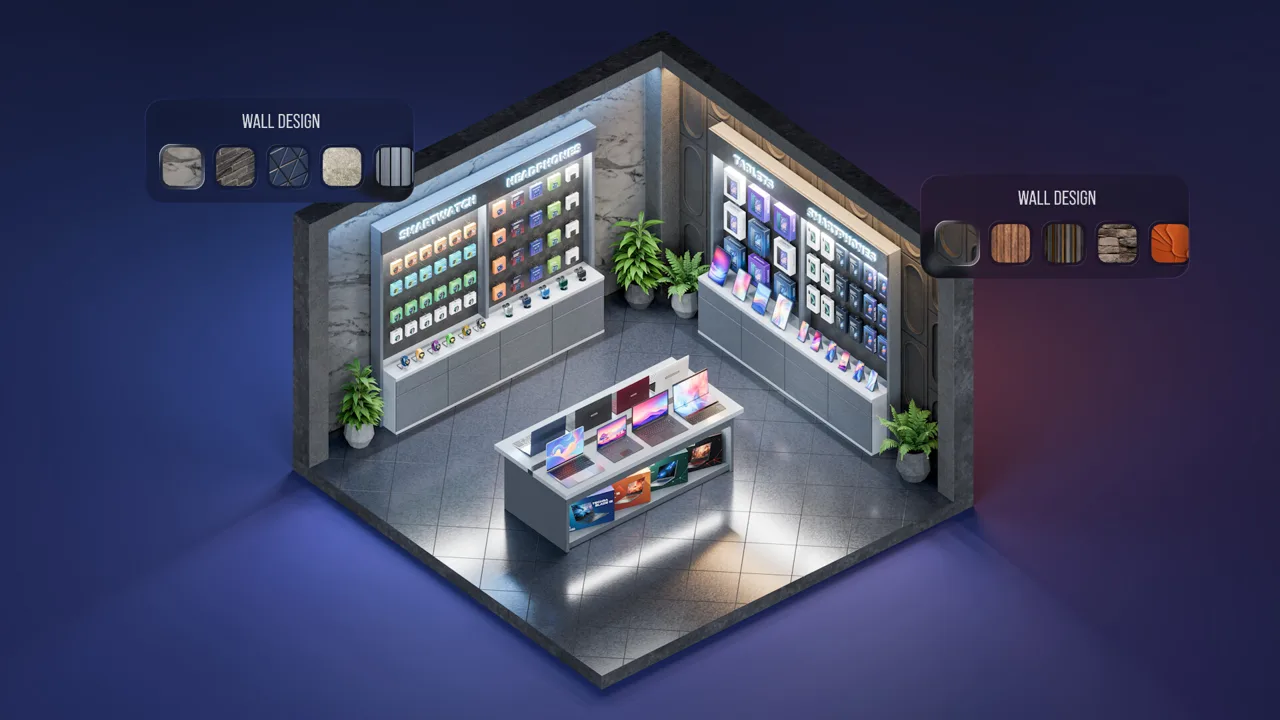 Image: Steam / Roastery Games
Those benefits come with a financial tradeoff. More advanced stores can handle more customers per day, but they also have higher maintenance costs.
Separate the different parts of store development when deciding where to spend.
| Store feature | What it changes | Financial consideration |
|---|---|---|
| Store upgrades | Customer flow and purchase conversion | Require investment |
| Higher store levels | Access to more visual options and layouts | More advanced stores have higher maintenance costs |
| More advanced layouts | Capacity to handle more customers per day | Added capacity comes with higher upkeep |
| Appearance customization | Interior and exterior design | Review retail finances alongside development spending |
Check customer visits, income, and expenses before upgrading. Then review those figures again after making the investment.
Keep the question specific: does the resulting retail performance justify the money committed to that location? Use the game's statistics to guide the next decision.
What Can You Customize?
The Store Appearance Editor lets you change your store's exterior and interior. Customization includes:
- Tables and shelves
- Floors and walls
- Signs
- Decorations
- Additional visual options and layouts as store levels increase
Give your locations a style that fits your company. Coordinate shelves, surfaces, signage, and decorations to make the retail side feel connected to your device brand.
Keep design choices distinct from the statistics you use to judge performance. Use the editor to shape the store's appearance, and use visits, income, and expenses to evaluate its operation.
Upgrade With Maintenance in Mind
Check the upkeep attached to a more advanced store before committing to further development. Higher customer capacity expands what the location can handle, while higher maintenance increases the money needed to run it.
Review both sides of that tradeoff whenever you develop Devices Tycoon stores. Plan for the ongoing expense as well as the upgrade investment.
Coordinate Retail Expansion With Regional Marketing
Marketing gives you another set of controls to consider alongside Devices Tycoon stores. On PC, campaigns let you choose a promotion type, daily budget, and target regions.
 Image: Steam / Roastery Games
Marketing increases device popularity and helps your company gain fans. Its effectiveness depends on both campaign settings and the employees running it.
All marketing operations are managed through the Marketing Office, which can be expanded and upgraded. Hire marketers before launching campaigns.
| Marketing control | What it manages | Practical action |
|---|---|---|
| Promotion type | The method used to advertise a device | Review marketing analysis before choosing |
| Daily budget | Campaign spending per day | Check it alongside recurring retail expenses |
| Target regions | Where the campaign is directed | Coordinate regional promotion with your expansion plans |
| Marketing employees | Campaign costs and efficiency | Consider employee experience when staffing campaigns |
| Marketing analysis | Changing effectiveness of promotion methods | Repeat analysis as marketing trends evolve |
Coordinate campaign regions with the markets you are developing. Keep the campaign's role clear: it promotes devices and attracts fans, while your retail statistics show store visits and financial performance.
Review each system through its own controls. A regional campaign adds marketing spending; a new store adds retail spending. Check the combined commitment before expanding both at once.
Revisit Campaign Choices
Marketing trends change over time. Some promotion methods become less effective, while others become more effective.
Run marketing analysis regularly and adjust your selections to match the results. Continuing with an outdated method can make promotion expensive and inefficient.
Experienced marketers can reduce costs and improve campaign efficiency. Include staffing in your review whenever you reassess marketing spending.
Keep Product Quality in the Picture
Your devices also affect the sales picture. Customer reviews appear after products reach store shelves, and higher review scores improve sales.
Read those reviews before making another major retail investment. Address product feedback through your device development decisions, and assess stores through their operating statistics.
Give each investment a clear purpose: develop the product, promote it, improve an existing store, or add another location.
Build a Repeatable Store Management Routine
Keep Devices Tycoon stores under regular review as your company develops. Retail expansion, store upgrades, and regional campaigns all compete for company funds.
Make one major spending decision at a time when evaluating its financial effect. Check the relevant statistics before the change and review them again afterward.
Use this checklist whenever you are considering more retail investment:
- Review store expenses. Check utilities, salaries, and operational costs.
- Compare country-level figures. Read income, expenses, and customer visits together.
- Review existing locations. Consider upgrades alongside opening more stores.
- Check marketing commitments. Include campaign budgets in your spending review.
- Inspect company finances. Use the detailed income and expense breakdown.
- Reassess costly locations. Sell stores when maintaining them no longer makes financial sense.
Treat this as a decision routine rather than a required progression order. Return to whichever figures explain the spending choice in front of you.
Several PC updates also help with financial review and experimentation.
| Update | Relevant change | How to use it |
|---|---|---|
| First post-launch update | Unlimited money in Sandbox Mode | Explore retail development without financial limits |
| Update 1.1 | Sandbox Mode available from the start | Begin experimenting without unlocking the mode |
| Update 1.2 | Detailed company income and expense breakdown | Inspect overall spending alongside retail figures |
| Update 1.3 | Further detail in company financial statistics | Review company finances before additional investment |
Use Sandbox Mode to explore store designs and development options. When managing a company with financial limits, return to expenses, income, and customer visits before committing money.
Avoid making every retail decision an expansion decision. Review what your current locations cost, what upgrades offer, and whether keeping a store open remains worthwhile.
FAQ
Can you open multiple Devices Tycoon stores at once?
Yes. On PC, you can open multiple stores in a single country or across several countries. Each store brings ongoing expenses, so check your finances before opening several locations together.
What do store upgrades do?
Store upgrades increase customer flow and improve the percentage of visitors who make a purchase. Higher store levels also unlock additional visual options and layouts. More advanced stores support more daily customers and cost more to maintain.
Can you sell stores that cost too much to maintain?
Yes. You can sell an individual store, several stores, or all stores in a selected country. Review income and expenses when deciding which locations to keep, especially when expenses significantly exceed income.
Can you customize store interiors and exteriors?
Yes. The PC Store Appearance Editor includes tables, shelves, floors, walls, signs, decorations, and other design options. Additional visual choices and layouts become available as the store level increases.
Continue with
 Devices Tycoon Company Acquisitions: Complete GuideMaster Devices Tycoon company acquisitions: reach 49% ownership, negotiate buyouts, and compare growth, income, and balanced strategies for your business.
More in Business

Devices Tycoon Device Presentations: A Launch Guide
Learn how Devices Tycoon device presentations build launch hype, attract fans, and work alongside press conferences, DevicesGram, and marketing campaigns.
Devices Tycoon Employee Management: Hiring & Morale
Master Devices Tycoon employee management with practical tips on hiring, upgrades, fatigue, bonuses, vacations, and offices. Build a stronger team on PC.
Devices Tycoon How to Make Money: Build Your Profits
Devices Tycoon how to make money: build device sales, balance app monetization, control store costs, and plan investments to grow your company's profits.
Devices Tycoon Investments: Stocks and Buyout Guide
Master Devices Tycoon investments with stock trading rules, the 49% acquisition requirement, company strategies, and tips for managing dividends and loans.
Join the community
Game links and player communities: